Searching for the best AI note taking app in 2026 means wading through a lot of near-identical marketing pages. Every app now claims AI summaries; almost none of them tell you what they're actually built for. A meeting bot that joins Zoom calls is a completely different tool from an app that records a lecture in a physical classroom, and both are different from a workspace that answers questions about your docs.
There's a real cost to picking wrong. In a Harvard Business Review survey, 65% of senior managers said meetings keep them from completing their own work — and if your note taker doesn't fit how you actually capture information, you'll end up doing the meeting and the note-taking manually anyway.
This guide compares seven apps that are genuinely good at something specific — including our own, which we disclose up front.
How we picked the best AI note taking apps
We judged every app on the same five criteria:
- Capture channels. Can it record live audio? Import files? Handle PDFs, photos, or pasted text? The more ways in, the fewer tools you need.
- Transcript quality. A summary is only as good as the transcript underneath it. We favored apps known for accurate speech-to-text and, where relevant, speaker labels.
- Study tools. Does the app help you use your notes afterward — flashcards, quizzes, Q&A — or does it stop at a summary?
- Privacy. Where do your notes live? Do you need an account? Is audio retained after processing?
- Price model. Free tier, subscription, bundled license, or hardware purchase. We don't quote exact prices because they change; we describe the model.
One disclosure before the list: Steno is our app. We've tried to be as even-handed about the other six as about our own limitations.
1. Steno — best for iPhone voice notes, lectures, and studying
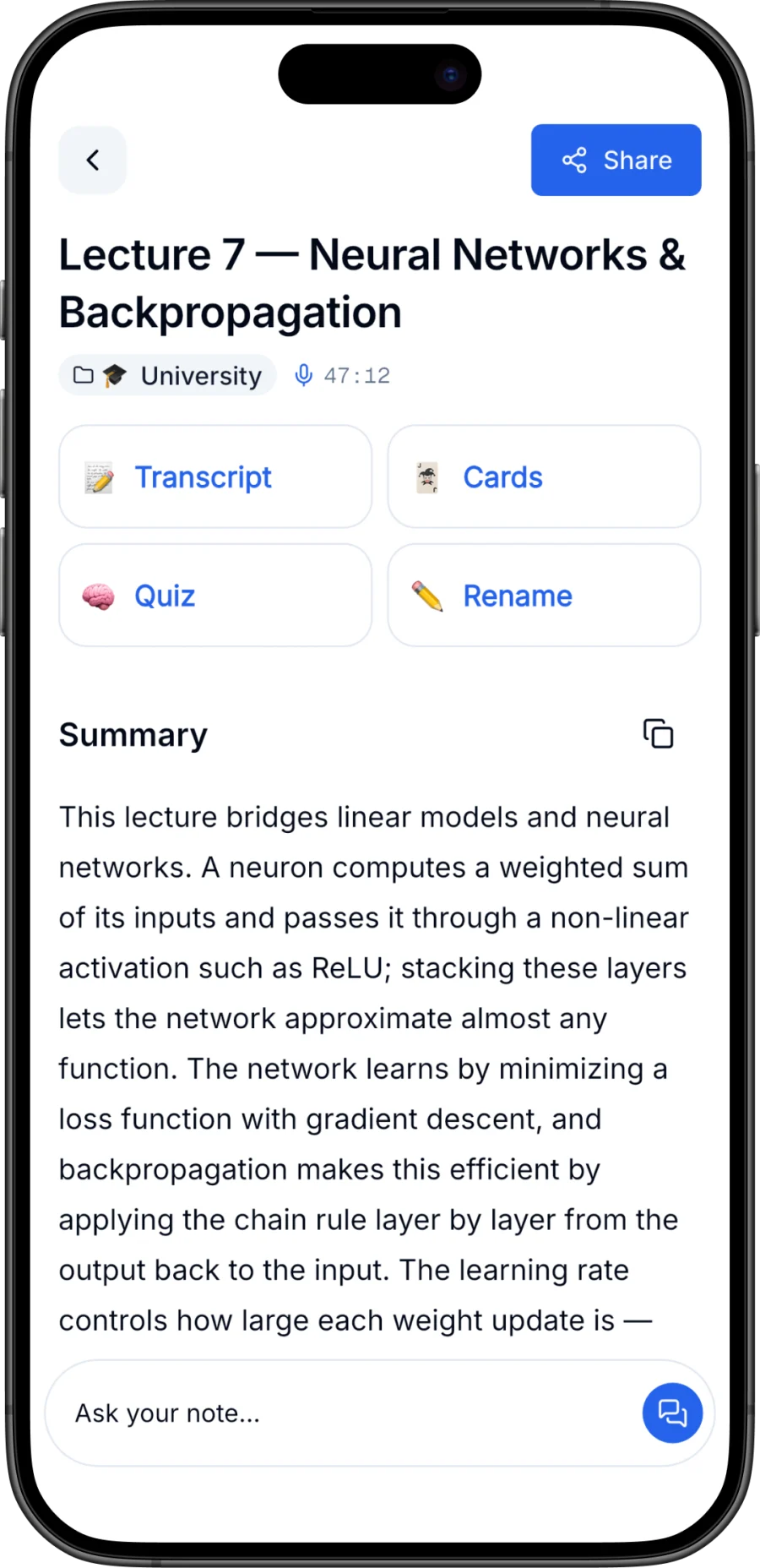
Steno is our app, so take this pick with that in mind. It's an iPhone app built around one loop: record something once, then actually learn from it. You can capture from five channels — live recording, audio file import, PDF import, pasted text, and photo scan with OCR — and Steno turns each note into a transcript, a structured summary, swipeable flashcards, a multiple-choice quiz, and a chat that answers questions from that note's content. That last part matters because testing yourself beats re-reading for retention, as Roediger and Karpicke's research showed.
No account is required and notes stay on your device; audio sent for AI processing isn't kept afterward. The free plan includes a monthly AI transcription allowance (with an on-device fallback) and the first 10 flashcards per note; quiz, chat, and speaker labels are part of Steno Pro.
The honest limitations: it's iPhone-only, and there's no meeting-bot or calendar integration — it records in the room, not inside Zoom.
Best for: students and iPhone users who record lectures or in-person meetings and want built-in study tools.
2. Otter.ai — best for online meeting transcription
Otter is probably the best-known name in meeting transcription, and for good reason: its assistant can join Zoom, Google Meet, and Microsoft Teams calls, transcribe them in real time, and produce summaries and action items without you touching a keyboard. Live transcription with speaker identification is its core strength, and teams use shared workspaces to search across everyone's meetings. At the time of writing, Otter offers a free tier with monthly transcription limits and paid plans that raise them.
Who it's not for: if most of your capture happens away from a laptop — lectures, in-person conversations, ideas in the car — a meeting-bot-first tool is solving a different problem than yours. Otter also requires an account, and your transcripts live in its cloud, which some users and organizations will need to clear with a privacy review first.
Best for: remote workers whose notes mostly come from scheduled video calls.
3. Notion AI — best for a notes-and-docs workspace with AI Q&A
Notion isn't a voice recorder at heart — it's a workspace where notes, docs, wikis, and project databases live together. Notion AI layers on top of that: it can answer questions across your whole workspace, summarize pages, draft and rewrite text, and pull together information you wrote months ago. If your team already lives in Notion, the AI turns an unwieldy wiki into something you can actually query. At the time of writing, Notion AI is offered as a paid add-on or bundled into higher-tier plans.
Who it's not for: people whose raw input is audio. Notion has been expanding its capture features, but its center of gravity is typed and structured content, not recording a two-hour lecture. There's also a learning curve — Notion rewards setup effort and punishes people who just want to hit record.
Best for: teams and heavy writers who want AI answers over an existing workspace.
4. Microsoft OneNote with Copilot — best for Microsoft 365 users
If your school or company runs on Microsoft 365, OneNote with Copilot is the path of least resistance. OneNote itself is free, mature, and everywhere — Windows, Mac, iOS, Android, web — with solid handwriting support and notebook organization. Copilot adds AI on top: summarizing pages, drafting content, and pulling answers from your notebooks, and it connects to the broader Microsoft ecosystem, including meeting recaps in Teams. At the time of writing, Copilot features require a qualifying Microsoft 365 subscription or Copilot license.
Who it's not for: anyone outside the Microsoft ecosystem. Copilot's value depends heavily on your organization's licensing, and OneNote without Copilot is a great free notebook but not an AI note taker. If you don't already have Microsoft 365 through work or school, other options on this list give you more AI per dollar.
Best for: students and professionals whose institution already pays for Microsoft 365 Copilot.
5. Fireflies.ai — best for teams that need meeting data in their workflow
Fireflies sends a bot ("Fred") into your Zoom, Meet, or Teams calls, transcribes them, and then does the thing sales and customer-success teams actually care about: pushes the results into the rest of the stack. It's known for integrations with CRMs and workflow tools — think Salesforce, HubSpot, and Slack — plus searchable transcripts, topic trackers, and AI summaries with action items. At the time of writing, it offers a free tier with limits and paid team plans.
Who it's not for: individuals. Fireflies is at its best when a whole team standardizes on it and the meeting data flows somewhere; a solo student or note-taker gets little from CRM sync and pays the same account-and-cloud privacy tradeoffs as any bot-based tool. For personal capture outside scheduled calls, it's the wrong shape.
Best for: sales, CS, and recruiting teams that want every call logged and synced automatically.
6. Plaud — best for dedicated recording hardware
Plaud is the odd one out on this list: it's hardware first. The credit-card-sized Plaud Note attaches to the back of your phone (MagSafe-style) and is known for its ability to record phone calls as well as in-person conversations; the wearable NotePin covers meetings and on-the-go capture. Recordings sync to the Plaud app, where AI generates transcripts, summaries, and mind maps. The appeal is a dedicated button that always works — no unlocking your phone, no app in the foreground, long battery life. At the time of writing, the model is a hardware purchase plus subscription tiers for AI processing beyond a basic allowance.
Who it's not for: anyone who doesn't want to buy, carry, and charge another device — and call-recording laws vary by region, so check consent rules where you live.
Best for: people who record constantly and want a physical device dedicated to it.
7. Goodnotes — best for handwritten notes with AI on iPad
If you think with a stylus, Goodnotes is the strongest home for AI-assisted handwriting. It's long been one of the definitive iPad note-taking apps — paper-like writing feel, PDF annotation, notebook organization — and its AI features build on that: handwriting-aware tools like spellcheck for written text, math assistance, and an "Ask Goodnotes" assistant that can answer questions about your documents, at the time of writing. If writing by hand is how ideas stick for you, this is the rare app that adds AI without asking you to give that up.
Who it's not for: audio-first people. Goodnotes is built around what your hand writes, not what the room says — lecture audio, meeting transcription, and study tools like auto-generated quizzes aren't its core job. It shines on iPad; other platforms exist but are less central.
Best for: students and visual thinkers who take stylus notes on an iPad.
Comparison table
| App | Best for | Platform | Capture | Study tools | Account required |
|---|---|---|---|---|---|
| Steno | iPhone voice notes and studying | iPhone | Live record, audio/PDF import, paste, photo OCR | Flashcards, quiz, chat | No |
| Otter.ai | Online meeting transcription | Web, iOS, Android | Meeting bot, live record, import | No | Yes |
| Notion AI | AI Q&A over a workspace | Web, desktop, mobile | Typed notes, imports | Q&A over docs | Yes |
| OneNote + Copilot | Microsoft 365 users | Windows, Mac, iOS, Android, web | Typed, handwriting, clips | Copilot Q&A | Yes (Microsoft) |
| Fireflies.ai | Team meeting workflows | Web, mobile | Meeting bot, import | No | Yes |
| Plaud | Dedicated recording hardware | Hardware + app | Device recording, calls | No | Yes |
| Goodnotes | Handwritten iPad notes | iPad-first, other platforms | Stylus, PDF annotation | AI document Q&A | Yes (for sync) |
Tiers and features change; treat this as a snapshot at the time of writing.
How to choose the best AI note taking app for you
Match the tool to where your information actually arrives:
- You're a student recording lectures. You need live recording that survives a two-hour class, plus retrieval tools — flashcards and quizzes, not just summaries. Steno and Goodnotes are the natural picks depending on whether you capture by voice or by stylus. Our guide to using an AI note taker for lectures covers the workflow in detail.
- Your meetings are on Zoom or Teams. Get a bot-based tool — Otter for individuals, Fireflies if the notes need to land in a CRM.
- Your meetings are in a room. Bots can't join a conference room. You want an app or device that records where you are — Steno or Plaud. We wrote a separate playbook on taking better in-person meeting notes.
- Your notes are mostly typed and you want answers from them. Notion AI, or OneNote with Copilot if you're already licensed for Microsoft 365.
- Privacy is the deciding factor. Prefer tools that work without an account and keep notes on-device; cloud-first tools require trusting a vendor with everything you record.
- You want to study from your notes, not just store them. Look for built-in retrieval practice. We've written about why turning notes into quizzes beats re-reading them.
If Steno's shape fits yours — iPhone, real-world audio, studying — you can download it free and test it on your next lecture or meeting. Our getting-started guide walks through the first note end to end.
Frequently asked questions
What is the best AI note taking app for students?
For voice-first students on iPhone, we'd point to Steno (our app — bias disclosed): it records lectures, imports PDFs and photos of slides, and generates flashcards and quizzes from your own notes. For stylus-first students on iPad, Goodnotes is the stronger fit. If your school provides Microsoft 365 Copilot, OneNote is worth trying before paying for anything.
What's the difference between an AI note taker and a meeting bot?
A meeting bot (Otter, Fireflies) joins your video calls as a participant and transcribes them in the cloud. An AI note taker like Steno records through your phone's microphone wherever you are — classrooms, conference rooms, interviews — and works without a calendar or meeting link. If your conversations happen in person, a bot can't hear them.
Are AI note taking apps private?
It varies widely. Bot-based and workspace tools store transcripts in the cloud under your account, which is convenient but means trusting the vendor. Some apps, including Steno, require no account and keep notes on the device, sending audio out only for processing without retaining it. Read the privacy policy of any app you'll use for sensitive conversations, and always get consent before recording people.
Do I need to pay for a good AI note taker?
Most tools on this list have a usable free tier — typically with monthly transcription or AI limits — and a subscription that removes them. The exceptions are Plaud, which requires buying hardware, and Copilot, which comes via Microsoft 365 licensing. Start free, confirm the transcript quality on your real audio, and only then pay.


